A full conversation with a model that knows your project — it writes read-only SQL against your local database, LoxiaFlow runs it on-device, and only the result rows go back to the model. Nothing about your project leaves your machine unless you're using a non-local model.
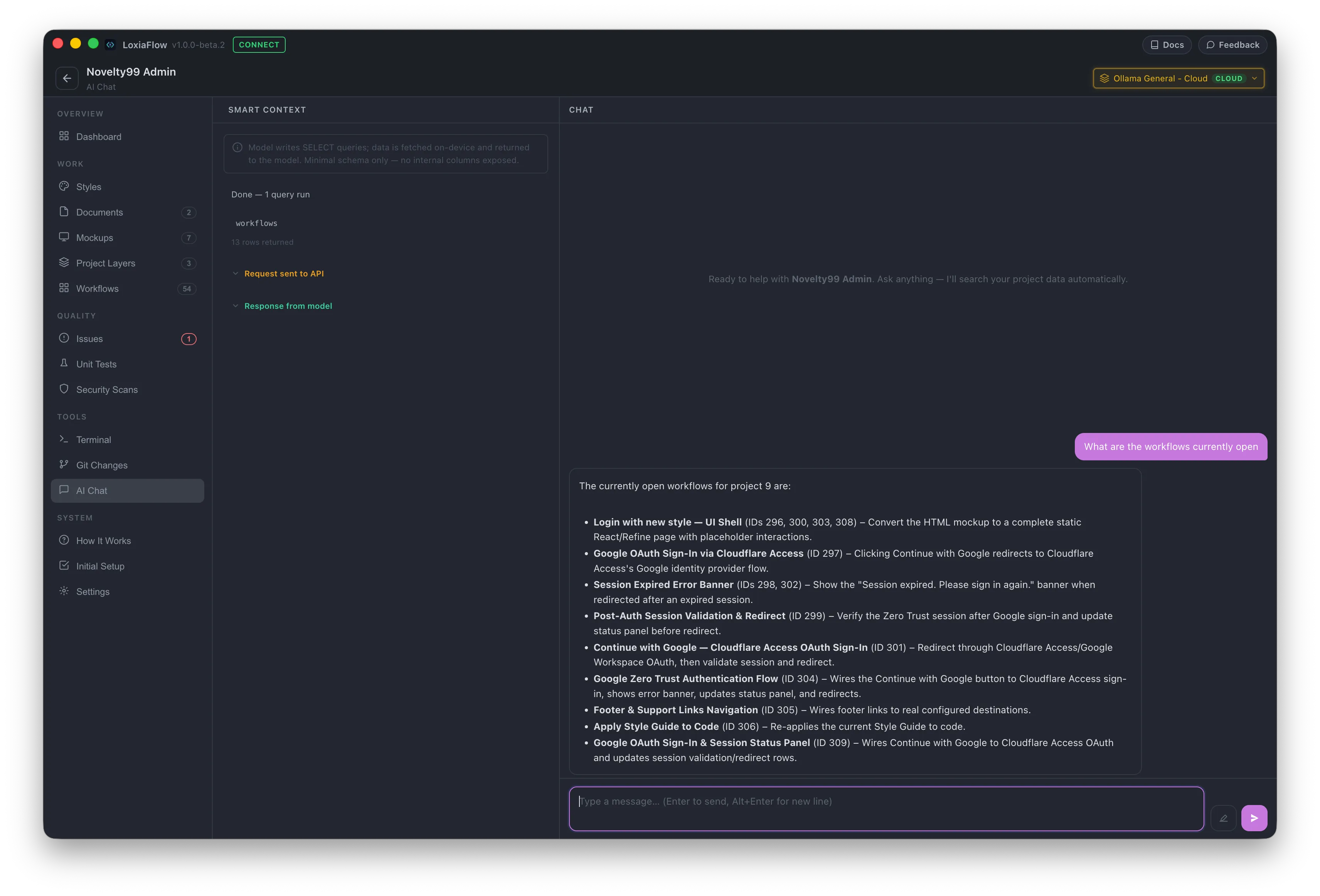
How Smart Context works
The model is given a minimal schema for six tables — projects, issues, workflows, project_layers, project_documents, screen_designs — with only user-relevant columns listed (no internal/audit columns). It can issue up to 3 rounds of SELECT queries per turn; each query runs on-device against your local database, and only the JSON result rows are sent back to the model, never your raw data dump.
Left panel — Smart Context
- A privacy warning banner appears whenever the selected model isn't a local Ollama model.
- A live query log — one entry per SQL query the model runs, showing the table(s) touched and the row count (or error); hover for the full SQL text.
- Collapsible "Request sent to API" and "Response from model" inspector panels, for full transparency into exactly what left your machine and what came back.
Right panel — Chat
A normal streaming chat thread with a custom Markdown renderer (headings, lists, tables, code blocks, inline SVG). History is capped to the last 10 exchanges sent as context per request (older turns stay visible but aren't resent).
The first time you message a non-local model in a session, a confirmation dialog explains the data will leave your device — this is asked again whenever you switch to a different non-local model (or after you hit Clear); LoxiaFlow only remembers your most recent confirmation, not one per model.
Privacy
100% Local Data, Zero Lock-In
LoxiaFlow stores everything in a local SQLite database on your machine — no account, no telemetry, no code upload. Your project data never leaves your premises unless you choose to connect a cloud model.
- ✓All project data stored in a local SQLite database on your disk
- ✓No account required — install and start working immediately
- ✓Zero telemetry or usage tracking of any kind
- ✓On-premises AI inference via Ollama — no network calls for model execution
- ✓Switch to cloud models any time, on your own terms
- ✓Export your data as standard formats — no vendor lock-in
Keyboard shortcuts
| Shortcut | Action |
|---|---|
Enter | Send |
Shift + Enter | Insert a newline |