Every model you connect gets assigned one of two roles, so LoxiaFlow always reaches for the right tool for the job — a subscription-based coding agent for heavy lifting, and a cheaper, faster model for everything else.
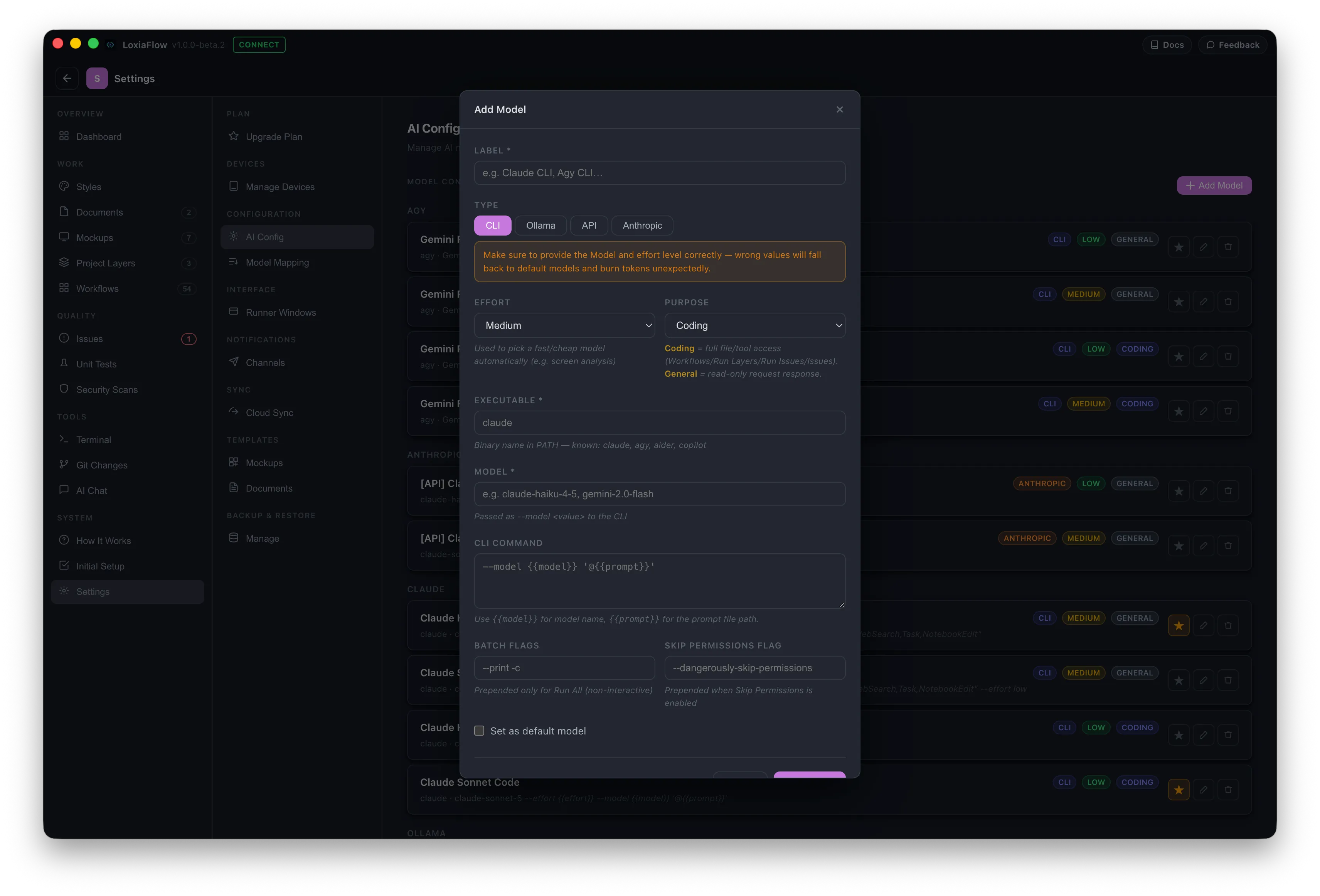
Coding
Routed through CLI-based tools tied to a subscription plan instead of pay-per-token API billing — Claude CLI, Agy CLI, and LoxiaFlow's own built-in Agent loop (running on top of a local or cloud Ollama model). These get full file read/write and shell-tool access, and are the only models usable for Project Layers "Run Setup,” Workflows/Workflow Runner, and Issue Runner — the features that actually touch your codebase.
General Purpose
Best suited to lighter, read-only interactions: Ollama, the Anthropic API, and any OpenAI-compatible API — OpenAI, Groq, Mistral AI, Together AI, DeepSeek, Fireworks AI, OpenRouter, LM Studio, and more — plus Claude CLI and Agy CLI running in a restricted, tool-free mode. Used for chat, document editing, mockup generation, and anything that only needs to read and respond rather than modify your codebase directly.
Bring your own tools
You're not limited to the tools named above. Any CLI binary already in your PATH can be added as a Coding model, and any OpenAI-compatible endpoint can be added as a General Purpose model — so tools like Aider, or providers you already have a key for, plug in the same way as the built-in options.
Example: adding a custom CLI tool
Say you use Aider instead of Claude CLI or Agy CLI. From Settings → AI Config → Add Model:
- Set Type to CLI
- Set Executable to
aider - Set Model to whatever string Aider expects (e.g.
gpt-4o) - Set Purpose to Coding, if you want it available for Workflows, Run Setup, and Issue Runner
- Build the CLI Command using the
{{model}}and{{prompt}}placeholders — LoxiaFlow fills these in at run time
Leave the permissions flag blank unless Aider needs one, or switch Purpose to General and supply your own restriction flag — LoxiaFlow only auto-fills that flag for tools it already recognizes.
Example: adding a custom API provider
Say you'd rather use OpenRouter than the Anthropic API directly. From Settings → AI Config → Add Model:
- Set Type to API
- Set Base URL to
https://openrouter.ai/api/v1 - Paste in your OpenRouter API Key
- Set Model to the string OpenRouter expects (e.g.
anthropic/claude-sonnet-4.5)
Purpose is fixed to General for this type — it'll power chat, document editing, and mockup generation, but not Workflows, Run Setup, or Issue Runner.